Network manager
Overview
Abeeway trackers are dual-connectivity devices, capable of communicating over both LoRaWAN and cellular networks (LTE-M / NB-IoT). Since both technologies share the same antenna, only one can be active at a time. A dedicated internal component, the Network Manager, manages which of these technologies is active at any given time and how it recovers from connectivity loss.
1. Network Manager
The Network Manager is the arbitration layer responsible for selecting the active communication technology (LoRaWAN or cellular) and transitioning between technologies when required and depending on user configuration.
1.1 Connectivity modes
The user can configure the network manager (see Configuration) to one of the following modes:
- LoRaWAN only — The device operates exclusively on LoRaWAN.
- Cellular only — The device operates exclusively on cellular (LTE-M/NB-IoT).
- LoRaWAN, cellular backup — LoRaWAN is the primary network, with automatic fallback to cellular if it becomes unavailable.
- Cellular, LoRaWAN backup — Cellular is the primary network, with automatic fallback to LoRaWAN if it becomes unavailable.
1.2 Network selection and fallback logic
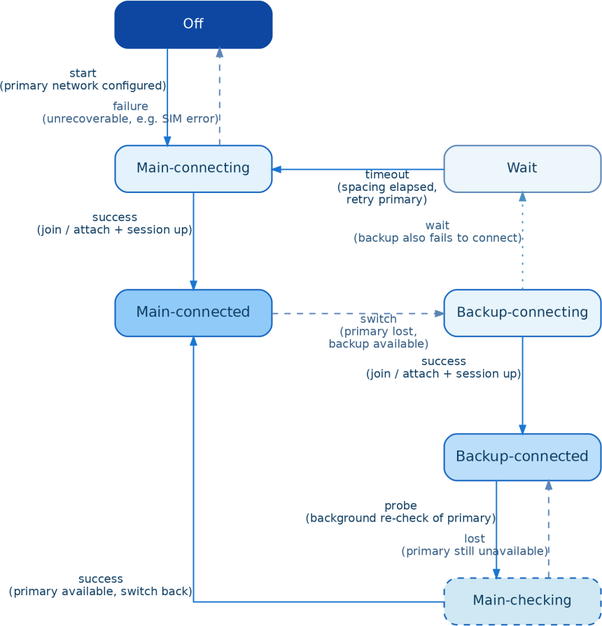
The Network Manager drives LoRaWAN and cellular based on the user's configured primary/secondary network. In fallback-capable modes, it continuously monitors the active connection's link quality and tries to switch back to the primary network.
Once connected, the device periodically checks that the link stays usable, rather than passively waiting for a failure. Check frequency adapts to the device's motion state: less frequent when stationary (saves battery), more frequent when moving (ensures tracking continuity).
If the primary network's health check fails or it can't reconnect, the device switches to the backup network automatically, with no user intervention. It keeps re-evaluating the primary in the background and switches back once it's confirmed available again.
The functioning of the Network Manager can be summarized in the following diagram
1.2.1 Primary network establishment failure
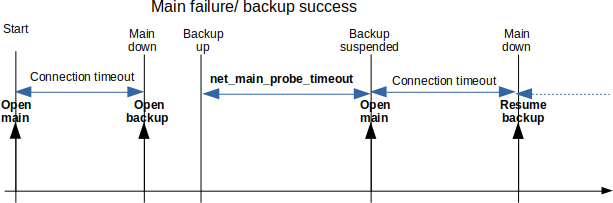
The Network Manager starts by establishing the primary network connection, based on the configuration. If the primary network fails to connect, or its link quality is not optimal as a result of failed health-check probes, the Network Manager flags the primary network as unusable and switches to the backup network.
1.2.2 Primary and backup networks failure
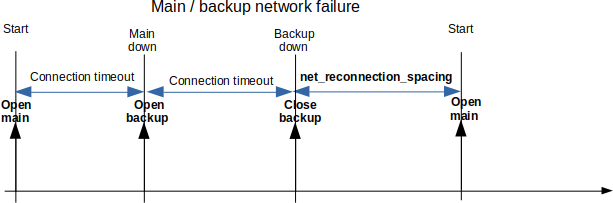
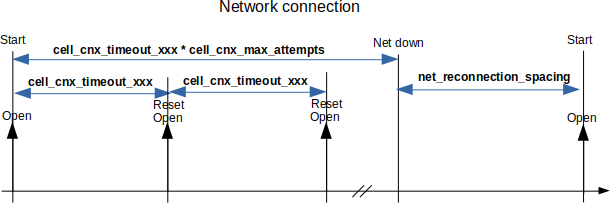
If both the primary and backup networks fail to connect, the device waits out the network reconnection spacing timeout, then restarts the connection sequence from the primary network.
1.2.3 Switch back to primary network when the backup fails
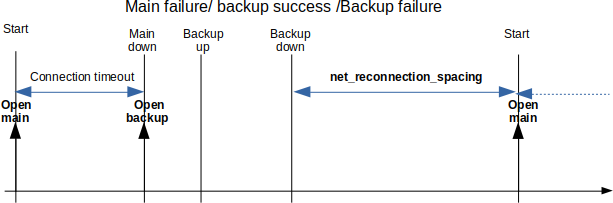
When the Network Manager is using the backup network — due to a primary connection establishment failure or an unreliable primary link — and the backup network is subsequently lost, the Network Manager reconnects to the primary network after the network reconnection spacing timeout, whose duration depends on the device's motion state.
2. LoRaWAN Technology
LoRaWAN is a Low Power Wide Area Network (LPWAN) technology optimized for infrequent transmission of small payloads over long range, at very low energy cost. Abeeway devices support LoRaWAN class A.
2.1 Network join
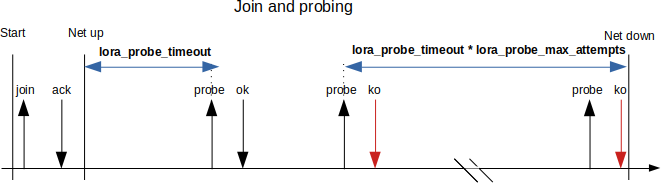
When the Network Manager selects LoRaWAN as the active network, the device performs a join procedure, registering itself with the LoRaWAN network server and negotiating the session parameters used for subsequent communication. Each join attempt is bounded by a time window, configurable by the user (see Configuration).
If the join attempt fails, LoRaWAN is flagged as temporarily unusable. Depending on configuration, the Network Manager then either falls back to the cellular network or waits for the configured network reconnection spacing timeout before attempting to join LoRaWAN again.

Join requests are sent using a randomized datarate, rather than a fixed one, to improve the odds of a successful join across varying range and interference conditions. The datarate for each attempt is drawn from a 16-entry sequence; each entry is used once and then excluded from subsequent draws until the sequence is exhausted, ensuring a balanced spread of datarates across attempts rather than repeated retries at the same one. The composition of this sequence depends on the regional frequency plan:
- Non-US915 regions: The sequence {DR0, DR1, DR2} is repeated 5 times. The last entry is set to DR0.
- US915: The sequence {DR0, DR0, DR0, DR0, DR0, DR0, DR4} is repeated twice. The last entry is set to DR0.
In practice, on the EU868 region, this means join requests are sent using spreading factors SF10, SF11, or SF12, selected randomly.
The frequency of join requests is also progressively reduced over time to balance rapid initial acquisition against long-term battery and network load:
| Elapsed time since first attempt | Join requests sent | Randomized interval between attempts |
|---|---|---|
| First hour | 35 requests | 50 sec, 1 min 30 sec, or 2 min 40 sec |
| Next 10 hours | 38 requests | 6 min 22 sec, 13 min 50 sec, or 24 min 50 sec |
| From the 11th hour onward | ~9 requests per day | 1 h, 2 h 17 min, or 4 h 7 min |
2.2 Link quality monitoring
Once joined, the device does not assume the connection remains valid indefinitely. It periodically issues lightweight link-check requests to confirm that the network is still reachable and reports meaningful signal quality feedback. The maximum number of probing attempts, and their periodicity while stationary and while in motion, are configurable by the user (see Configuration).
If the maximum number of probe attempts is reached without a link-check response, LoRaWAN is flagged as out of coverage. The Network Manager then takes over, managing either a rejoin attempt or a fallback to the cellular network, depending on configuration.
3. Cellular Technology
Cellular connectivity leverages standard mobile network technologies — LTE-M and NB-IoT — via the device's embedded cellular modem. It provides broader, carrier-grade coverage and higher throughput than LoRaWAN, at a higher energy cost per transmission.
3.1 Network attachment and session
Establishing cellular connectivity involves the device attaching to the mobile network and opening a data session (socket) over UDP or TCP. Since the attach procedure consumes significant energy, the modem's search time is bounded by a maximum number of retry attempts and a maximum search duration. This maximum search time depends on the device's motion state and is described in the Configuration.
When the device is unable to establish the connection within this period, the cellular network is flagged as unavailable, and the Network Manager switches to the LoRaWAN network, if configured.
3.2 Low power mode recovery mechanism
Cellular low-power modes (LPM) let the modem minimize current draw while remaining registered on the network, instead of fully detaching and re-attaching:
- eDRX (extended Discontinuous Reception) — the modem negotiates longer intervals between paging occasions (up to tens of seconds to minutes), reducing how often it must wake and listen, while still remaining reachable on a predictable schedule.
- PSM (Power Saving Mode) — after an inactivity period, the modem enters a deep-sleep state where it is unreachable from the network (no paging) but keeps its registration, avoiding a full re-attach when it wakes up. This gives the lowest power consumption of the two mechanisms.
Some operators — especially in roaming — and some network core implementations do not guarantee support for PSM or eDRX, resulting in the modem staying awake and draining energy. AT3 uses a low power mode guard (see Configuration) to limit the time the cellular modem spends in high-power mode.
If the timer expires while the modem is still in high-power state, the cellular network is flagged as temporarily unavailable and the Network Manager takes over recovery according to the configured network role:
- Cellular as backup network — on timer expiration, the device enters the network spacing period, then attempts to join the primary network (LoRaWAN).
- Cellular as primary network — on timer expiration, the device enters the network reconnection spacing period, then attempts to reconnect to the cellular network once the spacing period elapses.
3.3 Link quality monitoring
Once registered to the network and the transport protocol (UDP, TCP) session is established, the device does not assume the connection remains valid indefinitely. It periodically issues lightweight link-check requests to confirm that the end server is still reachable (especially when using UDP) and to obtain meaningful signal quality feedback. The maximum number of probing attempts, and their periodicity while stationary and while in motion, are configurable by the user (see Configuration).
If the maximum number of probe attempts is reached without a link-check response, the cellular network is flagged as unreliable, and the Network Manager takes over — either re-establishing the connection or falling back to the LoRaWAN network, depending on configuration.
3.4 Communication protocols
AT3 offers three communication protocols when using the cellular network:
-
UDP — Connectionless transport with minimal overhead: no handshake, no delivery acknowledgment, and no automatic retransmission. It conserves both airtime and battery, but since the network doesn't guarantee delivery or notify the device of a broken path, the device relies on the periodic link-check probing (see 3.3 Link quality monitoring) to detect if the server is still reachable.
-
TCP — Connection-oriented transport that establishes a session via handshake and guarantees ordered, acknowledged delivery, with automatic retransmission of lost packets. This removes the need for application-level reachability probing, at the cost of higher overhead and power consumption from the persistent connection and its keep-alive/retransmission mechanisms.
-
TCP & UDP with ASL — Regardless of the active network technology, all device communication is protected by the Abeeway Secure Layer (ASL), a proprietary security layer operating over both UDP and TCP transports. ASL provides:
- Mutual authentication between the device and the platform, ensuring data is only accepted from and delivered to legitimate endpoints.
- End-to-end encryption, ensuring payload confidentiality independent of the transport network's own security properties.
3.5 Public land mobile network (PLMN) restriction
When the cellular network is configured as backup (LoRaWAN as primary) and the device registers on a specific Public Land Mobile Network (PLMN, identified by its MCC/MNC), the Network Manager can be configured to suppress primary-network probing.
The rationale is geographic correlation: a given PLMN is typically tied to an operator's coverage footprint, which can reliably indicate that the device is in an area outside LoRaWAN coverage. In that case, periodic LoRaWAN probing serves no purpose and only adds unnecessary radio-on time and power consumption.
AT3 supports configuring a list of PLMNs for which LoRaWAN primary-network probing is disabled while cellular backup is active (see Configuration).
3.6 Aggregation
Rather than triggering the cellular modem on every individual uplink, AT3 applies an aggregation timeout that batches multiple uplinks into a single cellular session. Since each modem wake-up, network attach, and session teardown carries a significant fixed energy cost, consolidating several uplinks into one session substantially reduces average power consumption, at the expense of added latency for the buffered uplinks (see Configuration).